pi-cluster
Home · Getting Started · Cluster Guide · Troubleshooting

About
Why this cluster exists, what Hadoop and Spark are, and the history of the build.
- Purpose
- Background: Hadoop and Spark
- Builds, with photos of the original build and how to measure success
Purpose
The main reason for building and configuring this cluster is to leverage Hadoop and Spark’s distributed storage and processing capabilities to build, train, test and assess Machine Learning models in parallel for projects at work and also to demonstrate you may not need to invest in full-powered computers or servers to build a cluster.
I found myself training 311 XGBoost models on time-series financial data that would take about 7 hours to train total. As a result, the goal here is to at least reduce the amount of time it takes to train all models. By having a separate cluster, I allow myself to continue working on other tasks while the cluster takes the load. That is when the idea of a Raspberry Pi cluster kicked in.
Design
The 311 models are independent: each learns from its own series. The cluster therefore splits the work by series and trains one model at a time on each worker, with all four of the worker’s cores working on that one model. Four workers train four models at once.
Hadoop’s file system (HDFS) stores the data and the trained models, and Spark hands out the series to the workers. Learning Hadoop and Spark on real hardware is part of the point of this project, alongside the speed-up. Measuring success explains how to tell whether the cluster is actually faster.
Background: Hadoop and Spark
We live in a digital world full of data. Whether that is un-, semi- or structured data, there are many things we can do with it if we make use of Machine Learning (ML). More specifically, supervised, unsupervised or reinforcement learning algorithms are used to build models that learn (train) and discover patterns from historical data to predict an outcome. There are numerous applications of ML such as weather forecast (prediction), storm tracking models, among others.
- Hadoop is a software framework for storing and processing large data sets across a cluster of computers. This guide uses its file system, HDFS, which splits files into blocks and keeps copies of each block on several machines.
-
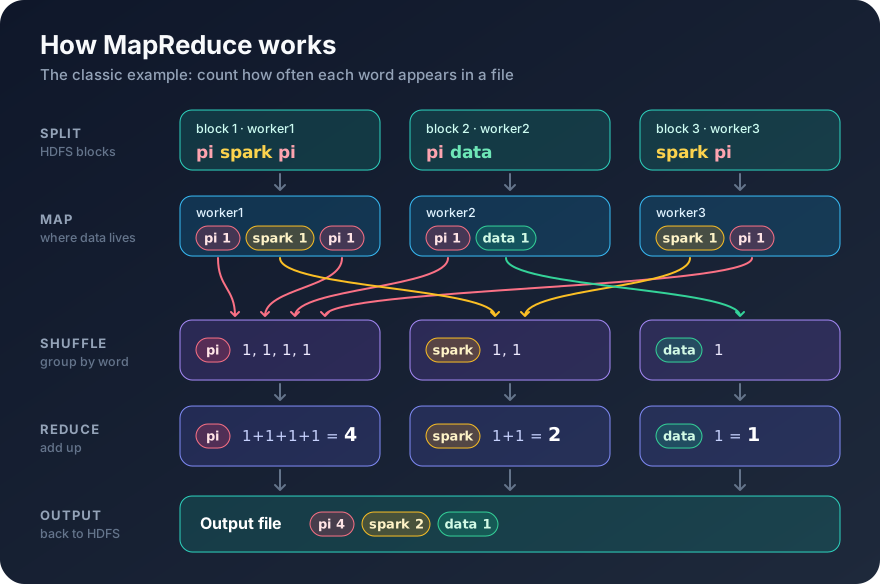
MapReduce is Hadoop’s original way of processing data in parallel: a map step works on each block where it’s stored, and a reduce step combines the results. Here it is counting the words in a file:
- Spark is a newer engine for large-scale data processing. It keeps data in memory between steps, which makes it much faster than MapReduce, and you can drive it from Python.
It all sounds similar, so here is how the pieces fit together on this cluster:
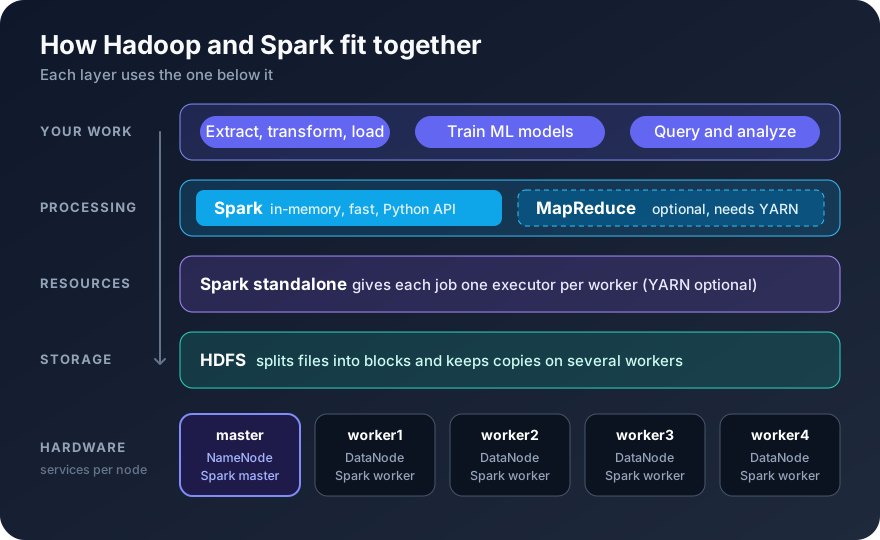
The cluster lets you extract, transform and load (ETL) data and train models with Spark, while HDFS stores the data. Analysis and visualization of the results are up to you.
Builds
The cluster was first built in 2020 on Raspberry Pi 4 boards and ran Hadoop and Spark successfully. The guide has since been updated for current software and for the Raspberry Pi 5, the newest model, while keeping full support for the Raspberry Pi 4. Where the two boards need different parts or settings, the guide shows both.
| Build | When | Boards | Operating system | Result |
|---|---|---|---|---|
| Original build | 2020 | 5 × Raspberry Pi 4 Model B, 2 GB | Raspbian (2020 release) | Worked, including HDFS and Spark. The Hadoop and Spark pages were written later, in the 2026 update |
| 2026 update | October 2026 | Written for 5 × Raspberry Pi 5 or 5 × Raspberry Pi 4 | Raspberry Pi OS Lite 64-bit (Debian 13) | Not built on hardware. Steps updated from the original build; the training job was tested on a Spark 4.2 cluster on a regular computer |
The original build
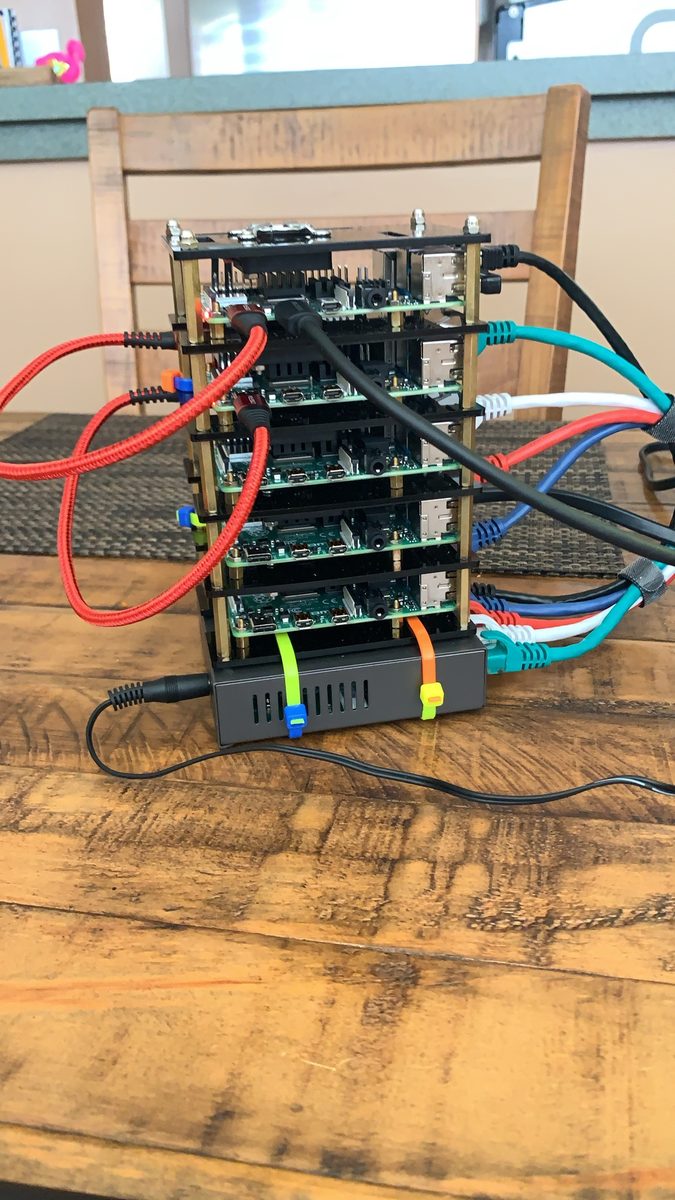
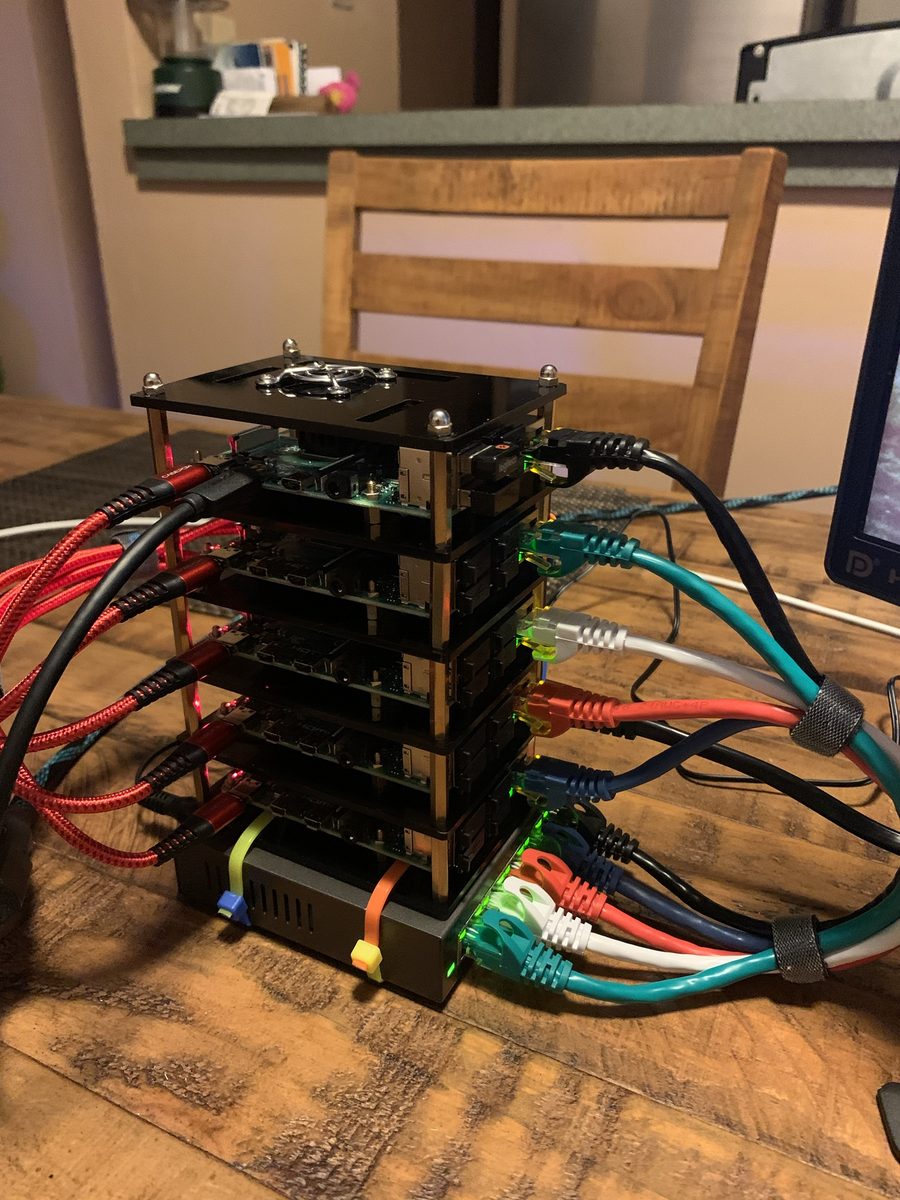
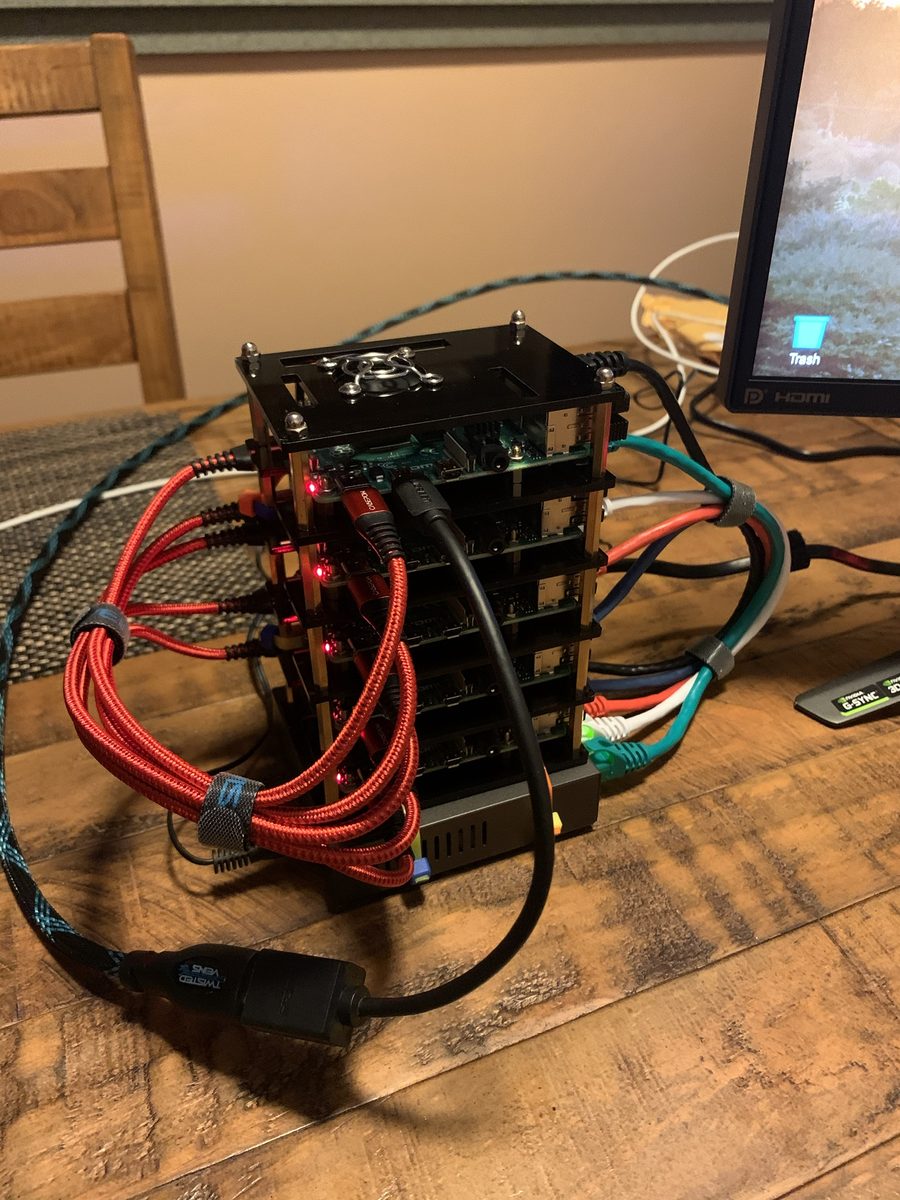
The 2020 cluster: five Raspberry Pi 4 boards in a stacked acrylic case with a fan on top, master at the top and four workers below. Each board has its own USB power cable on the left and an Ethernet cable on the right, running down to the network switch the stack sits on.
Measuring success
The baseline. On my computer, each model took about 81 seconds to train, including cross-validation and a randomized grid search. For all 311 models:
311 models × 81 s ≈ 25,200 s ≈ 7 hours
Success means the cluster trains all 311 models in less than that, measured with the same script and data on both sides.
Why a slower Pi can still win. A Raspberry Pi core is slower than a laptop core, especially on a Pi 4, so one model will usually take longer than 81 seconds on a Pi. That alone doesn’t mean the cluster loses, because four workers train four models at the same time:
- Rounds. 311 models ÷ 4 workers = 77¾, so the cluster needs 78 rounds of “one model on each worker”.
- Cluster time. Each round takes about as long as one Pi takes to train one model, so the whole run takes about 78 × the time per model on one Pi.
- Break-even. To finish under 7 hours, each round must take less than 25,200 s ÷ 78 ≈ 323 s, about 5.4 minutes.
So the line between a win and a loss is about 5.4 minutes per model on one Pi, not 81 seconds:
| Time per model on one Pi | Cluster time for 311 models | Result |
|---|---|---|
| 81 s or less | 78 × 81 s ≈ 1¾ hours or less | Clear win, about 4 times faster than one computer |
| 81 s to about 5.4 min | between 1¾ and 7 hours | Still a win. Each model is slower, but training four at once makes up for it |
| More than about 5.4 min | more than 7 hours | Slower than one computer |
On the original Pi 4 build, a model took longer than 81 seconds, but the exact time wasn’t recorded, so it’s unknown whether that build beat 7 hours. A Pi 5 is faster, so it has a better chance; the only way to know is to measure it. Workload shows how.
Even when a fast computer is quicker, the cluster still frees that computer for other work while the models train, and each extra worker adds another model in parallel.
Built it with these steps? Please open an issue with your boards, RAM, OS image date and benchmark time, or if a step didn’t work for you.
Back to the Cluster Guide